The way organizations create and manage content is changing. Editors need predictable tools, reusable components, and workflows that don’t require developer intervention. Drupal has the foundation for this – structured content, strong governance, and a stable architecture – but the editorial layer is undergoing a meaningful shift.
In 2026, the editor experience in Drupal will evolve beyond Layout Builder experiments and WYSIWYG-heavy pages. The focus is moving toward pattern-driven design, semantic structure, component libraries, and safer workflows that reduce friction for content teams.
This article explains what’s changing, why it matters, and how Drupal’s recent 11.x improvements (including the 11.3 beta) are accelerating this direction.
Why the editor experience matters in 2026
CMS complexity used to be a necessary tradeoff for flexibility. Today, editorial teams operate differently:
- Multiple contributors publish daily
- Design systems must stay consistent
- Accessibility requirements continue to rise
- Time-to-publish is a strategic KPI
- Content debt grows faster than technical debt
Editors can’t spend time manipulating layouts or correcting formatting drift. And they shouldn’t have to – not when Drupal already provides the building blocks for predictable, accessible content.
The issue isn’t that Drupal is lacking. The issue is that many organizations still rely on patterns from the 2014-2020 era: heavy WYSIWYG usage, ad-hoc layouts, one-off blocks, and cloned pages.
The evolution underway now solves exactly that.
The real editorial challenges in large Drupal sites
As Drupal sites grow, their editorial complexity grows with them. Pages accumulate small variations, new content types are added over time, and layout decisions made years ago continue to shape how editors work today. None of this is unusual – it’s the natural outcome of a CMS that supports long-term evolution.
The most common challenges appear when websites rely heavily on older editing patterns or accumulate one-off solutions created to solve immediate needs. For example: a program page built differently from a service page, a cloned landing page with its own spacing quirks, or a set of layout overrides created during a redesign that never made it back into the base templates.
Below are the issues that typically create the most friction for editors, regardless of industry.
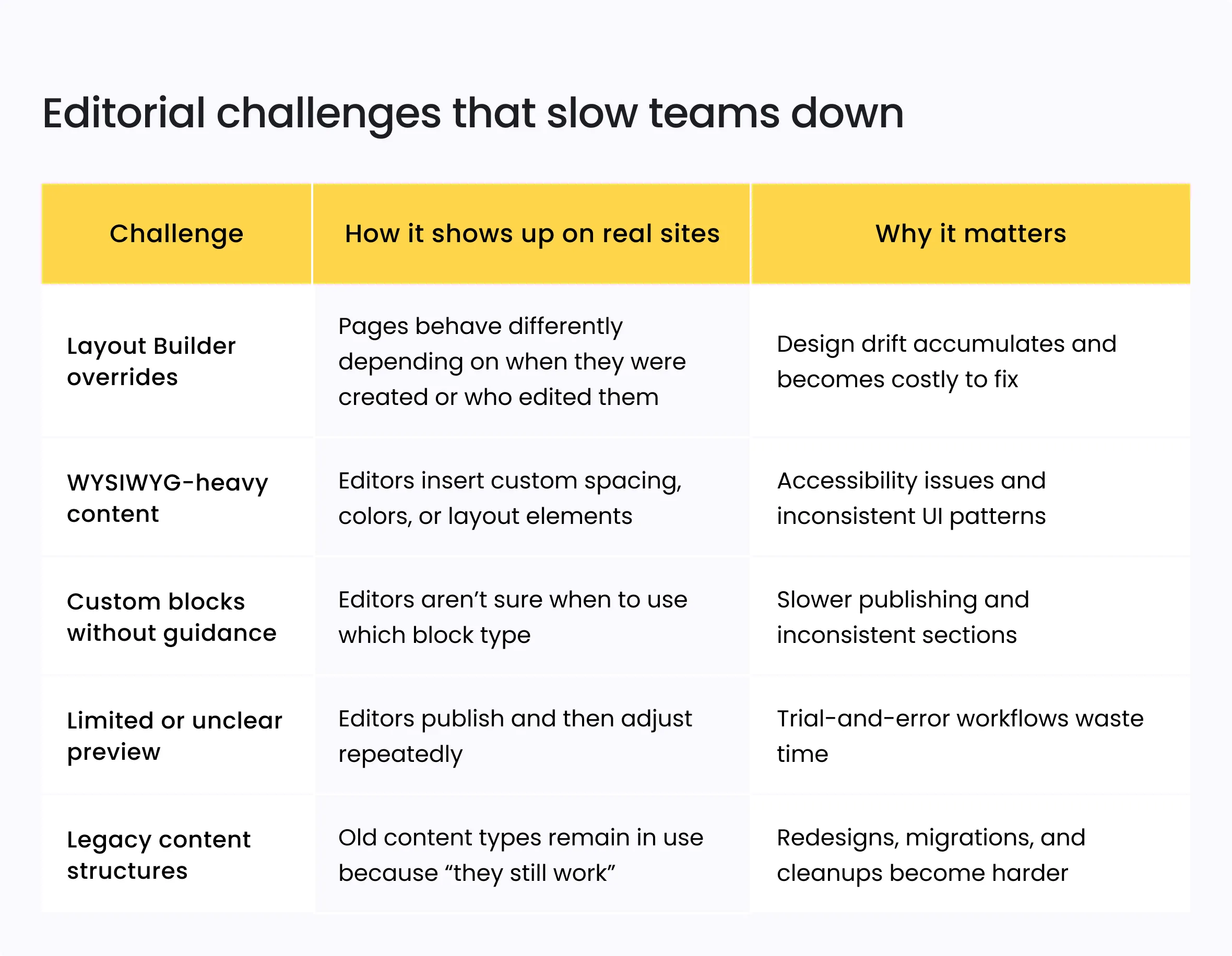
These issues appear everywhere – from nonprofit websites with hundreds of program pages, to university content hubs with distributed editors, to YMCAs managing constantly changing schedules and branch information.
They are not failures of Drupal.
They are the result of sites evolving without a clear, unified editorial model.
From page builders to pattern systems
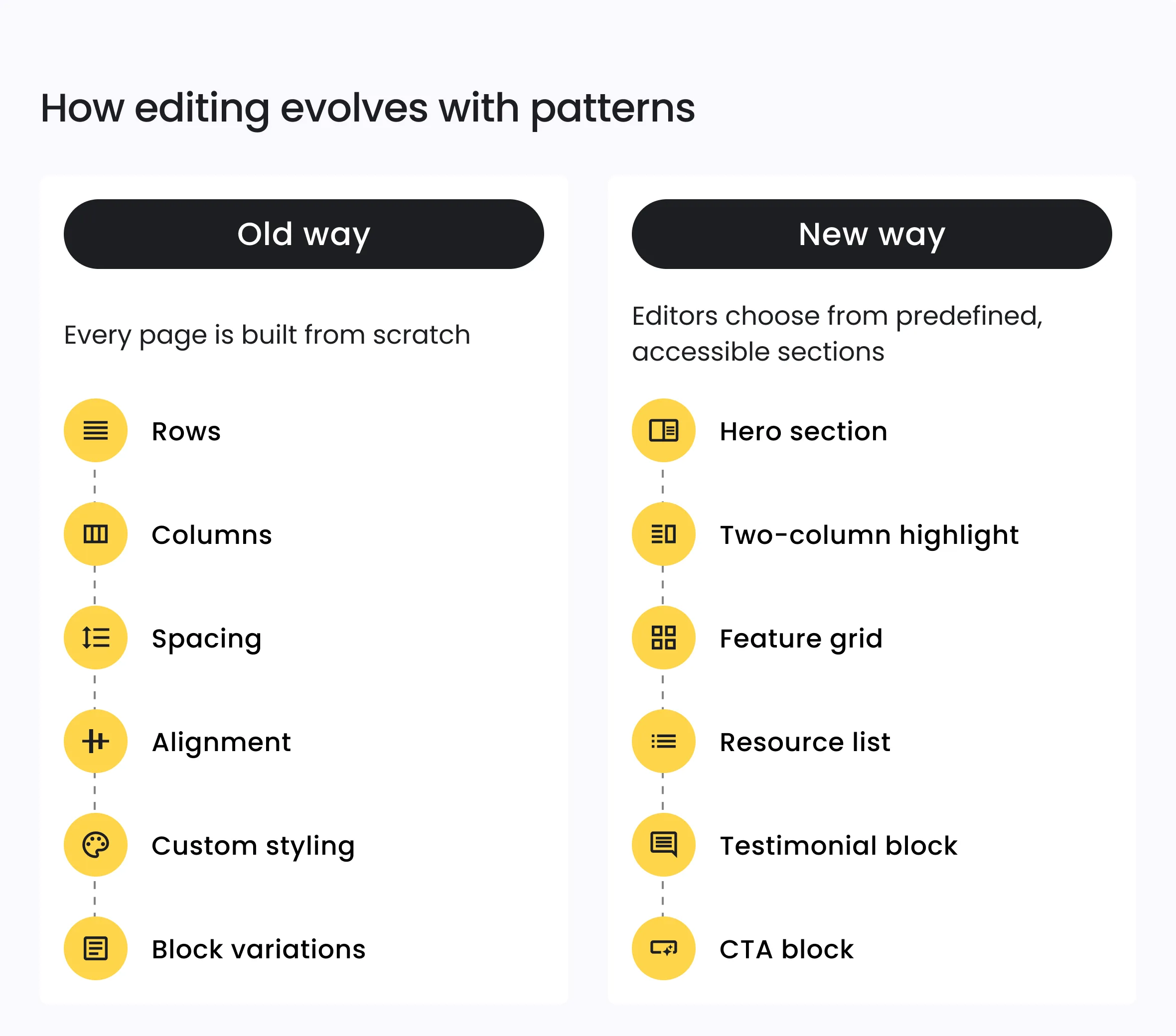
One of the biggest shifts in Drupal’s editorial experience is the move from page-by-page layout decisions to pattern-based editing. Instead of assembling rows, columns, and blocks manually, editors work with predefined sections that already reflect the site’s design system, accessibility rules, and responsive behavior.
This approach reduces cognitive load and prevents small layout inconsistencies from accumulating over time. Editors choose from a library of reusable patterns – not from raw structural tools – which keeps pages stable even as content changes.
Why this shift matters
- Editors publish faster because they don’t have to “design” each page
- Design consistency becomes automatic, even across hundreds of pages
- Accessibility remains intact because patterns carry semantic markup
- Redesigns and future upgrades become significantly easier
- Front-end spacing and breakpoints behave the same everywhere
A pattern library can include common structures used across mission-driven sites, such as:
- Hero sections
- Two- or three-column feature areas
- Event/program summaries
- Resource grids
- Testimonial or impact blocks
- Calls to action
- Staff or advisory board profiles
These are the building blocks most organizations use repeatedly. Formalizing them into editable patterns removes guesswork and ensures the site behaves predictably over time.
Hybrid editing: visual when it helps, structured when it matters
Pattern systems solve the problem of layout consistency, but they don’t fully address how editors interact with the content inside those patterns. That’s where the next evolution comes in: hybrid editing. Drupal’s modern approach blends visual clarity with strict semantic structure, giving editors confidence in what they’re publishing while ensuring the content remains stable and reusable.
Drupal has moved past the old binary of pure WYSIWYG or pure structured fields. Modern sites need both: visual feedback for editors and predictable data for long-term maintainability. Hybrid editing delivers this by letting editors work with components that look like the final output, while each field inside the component remains typed, validated, and consistent across the site.
A practical example
A Program Overview section might include:
- Program title
- Audience (taxonomy)
- Branch or location (entity reference)
- Short description using restricted CKEditor formatting
- Image with required alt text
- Primary and secondary CTAs
Editors see a complete, styled preview, but the underlying structure remains clean and machine-readable.
Why hybrid editing works well
- Editors understand what the final page will look like
- Designers retain control over spacing, typography, and accessibility
- PMs get predictable data models that support reuse and integrations
- Redesigns become significantly easier because structure stays intact
The CMS prevents one-off formatting fixes that create future debt
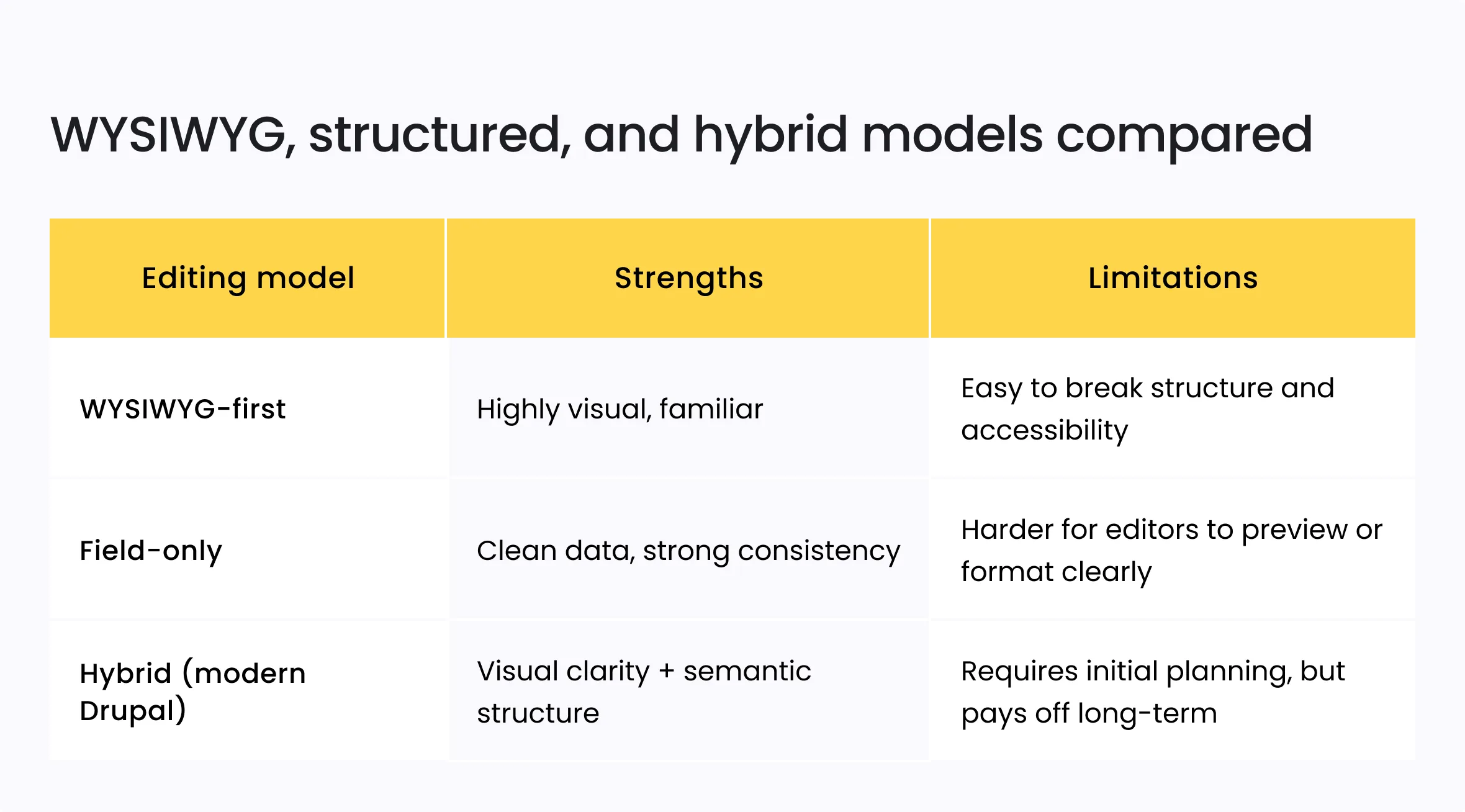
Hybrid editing aligns closely with how real teams work: visual, where it improves speed and confidence, and structured, where it improves sustainability and quality.
The component era: Drupal moving past Layout Builder
Pattern systems help stabilize layouts, but they still depend on the underlying building blocks editors work with every day. This is where the next shift becomes clear: Drupal is steadily moving from ad-hoc layouts toward component-based editing built on predictable, reusable, design-system-driven elements.
Layout Builder played an important role in this evolution. It showed teams what visual editing inside Drupal could look like. But in real-world, long-lived sites, Layout Builder’s flexibility often leads to layout overrides, spacing inconsistencies, and pages that drift away from the base templates over time.
Component-driven editing solves these issues by giving editors sections that are fully designed, accessible, and tested, without requiring them to adjust structural styling or layout behavior.
Why component-based editing matters
- Components maintain consistent spacing, typography, and breakpoints
- Editors no longer need to manipulate layout tools to achieve a desired look
- Pages stay aligned with the design system even as content changes
- Redesigns become dramatically faster because components update globally
- The CMS becomes easier to govern across distributed editorial teams
It’s not about removing flexibility – it’s about moving the flexibility into the right layer. Editors get reliable tools, and designers/developers retain control where consistency and accessibility matter.
Examples of components commonly used across modern Drupal sites include:
- Hero banners with accessible heading hierarchy
- Structured content cards
- Staff or leadership profile blocks
- Event or program summaries
- Resource grids with taxonomy filtering
- Testimonial or impact sections
- Calls to action tied to campaign or membership goals
Because these components carry semantic markup and styling rules, editors spend less time fixing layouts and more time publishing content.
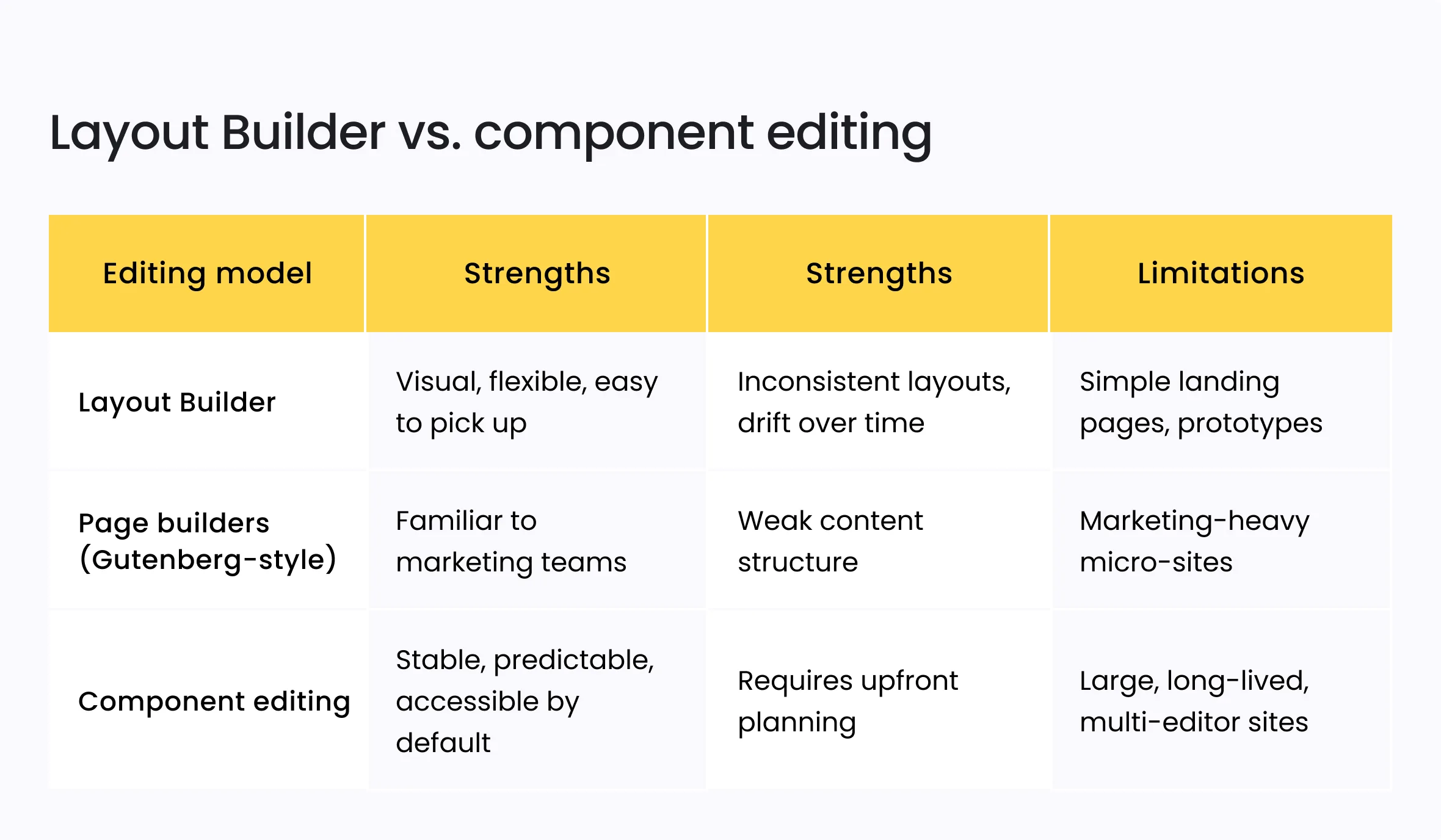
Component-driven editing aligns with what most organizations need today: fewer layout decisions, more structured reusability, and a more sustainable editorial ecosystem.
Workflows that match how teams actually publish
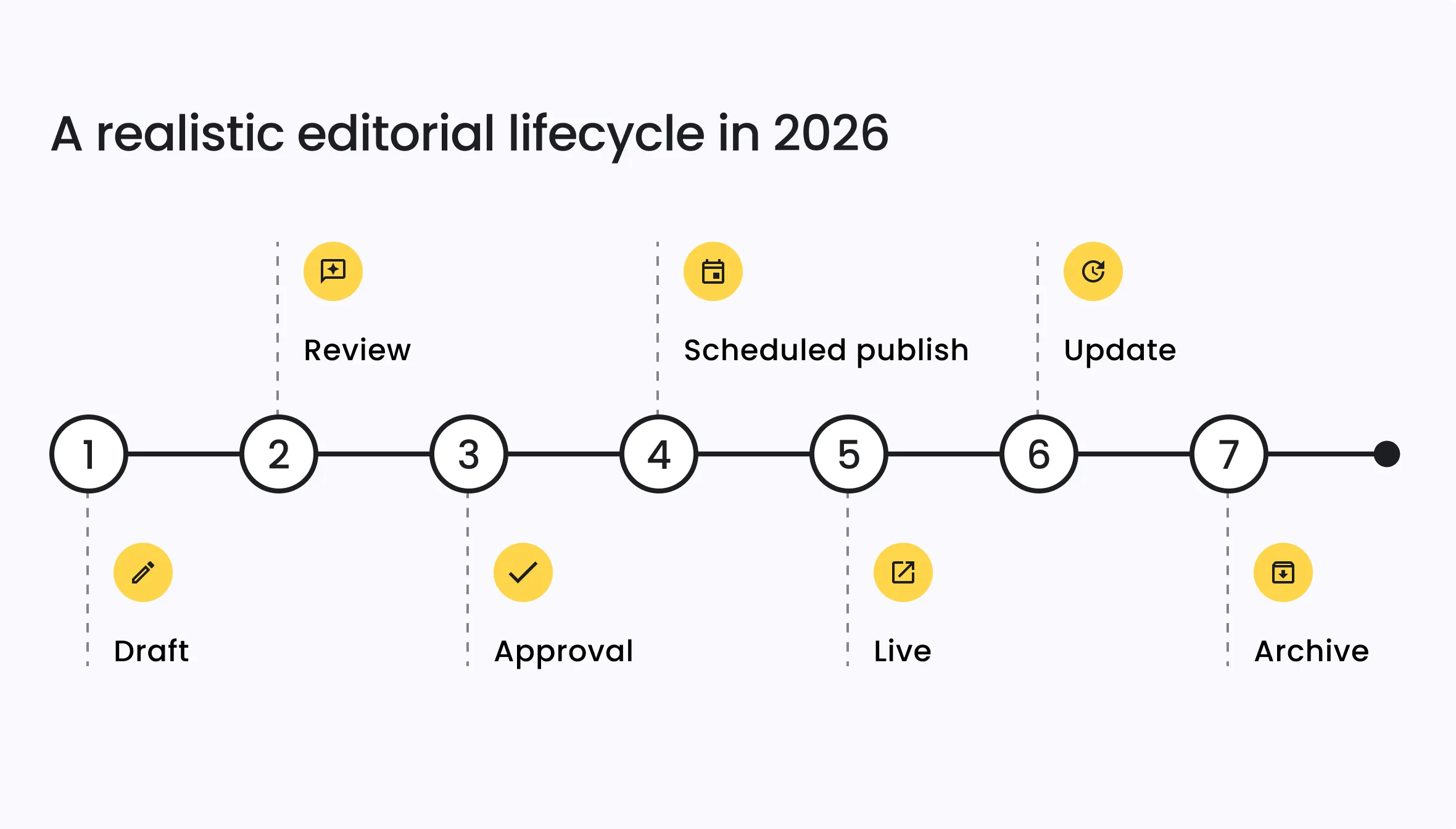
Even with strong patterns and components in place, publishing still depends on how teams review, approve, and schedule content. Most organizations don’t publish in a straight line: they work through drafts, stakeholder reviews, approvals from different departments, and timed releases tied to programs or campaigns. A CMS workflow has to reflect this reality, not force editors into workarounds.
Drupal’s workflow tools have matured to support these needs with clearer moderation states, more predictable revision handling, and scheduling that works well with structured components. Editors know what stage their content is in, reviewers know when something is ready for approval, and PMs can trust that the right version will go live at the right time.
What modern workflows look like in practice
- A draft of a new program page moves to review
- Communications or legal provides edits without losing earlier versions
- A PM schedules publication to align with a campaign launch
- Editors update related pages without affecting the scheduled version
- Archived versions remain accessible for reference or reuse
Why Drupal’s workflow improvements matter
- Clearer moderation states reduce back-and-forth
- Version comparisons help reviewers understand changes quickly
- Scheduled publishing works reliably with component-based layouts
- Permissions aligned with roles prevent accidental edits
- Notifications and queues give distributed teams visibility into what needs attention
Instead of relying on spreadsheets, Slack messages, or manual reminders, content moves through a predictable flow that matches how real teams operate.
Accessibility as an editorial default, not a post-check
Accessibility can’t be treated as a final review step anymore. It has to be built into the editing process itself. Modern Drupal sites increasingly take this approach by ensuring that the components, fields, and workflows editors use already follow accessible patterns, reducing the need for cleanup later.
When accessibility is handled at the component and template level, editors don’t have to guess whether headings are structured correctly, whether interactive elements include proper labels, or whether spacing and contrast meet standards. The CMS does the heavy lifting, and editors simply provide the content.
What accessible by default looks like in Drupal
- Semantic headings baked into components instead of being chosen manually
- Design tokens with approved color contrast that editors can’t override
- Required alt text for images and media
- ARIA roles and landmarks handled by templates, not editors
- Accessible form patterns applied consistently across the site
- Structured content fields to prevent layout misuse
- Keyboard-friendly admin experience that supports diverse editing needs
This doesn’t limit creativity, but it reduces the chance of accessibility regressions caused by inconsistent formatting or improvisation within a WYSIWYG.
By shifting accessibility into the system rather than the editor’s discretion, Drupal reduces risk, improves consistency, and ensures that content remains usable and compliant as the site evolves.
Drupal 11.3 beta: small updates, clear direction
Drupal 11.3 beta doesn’t introduce new concepts, and it doesn’t try to. Instead, it reinforces the direction Drupal has been moving toward: a more predictable, accessible, and editor-friendly system built on consistent UI patterns and stable components.
These improvements are incremental, but they matter because they target the practical details editors encounter every day – the things that shape how smooth or frustrating the editing experience feels over time.
What stands out in Drupal 11.3 beta for editorial teams
- More consistent UI spacing and alignment across admin screens
- Clearer block style visibility so editors understand what’s available
- Refinements in CKEditor 5 that reduce formatting quirks
- Better performance in page-building flows
- Accessibility fixes that improve both editing and output
- More stable interaction patterns when working with layouts and media
Individually, none of these changes would justify a major announcement. But together, they reflect a deliberate, steady push toward a cleaner editing experience – one with fewer surprises, fewer inconsistencies, and fewer places where editors need workarounds.
Why this matters
In long-lived Drupal sites, editor experience issues rarely come from one major problem. They come from dozens of small inconsistencies that accumulate over time. Drupal 11.3 beta reduces that friction, strengthens baseline UI patterns, and supports the broader shift toward component-driven, predictable content creation.
What organizations should prioritize in 2026
Improving the editor experience doesn’t require a full rebuild. Most organizations already have the foundation they need. They just need to modernize the parts of the system that editors interact with most. The highest-impact improvements tend to be the ones that remove daily friction and reduce long-term content debt.
1. Consolidate layouts into reusable patterns
Replace one-off layouts, clones, and overrides with a clear library of predefined sections.
This immediately improves consistency and reduces the number of layout decisions editors have to make.
2. Move toward component-driven editing
If layouts are stable but components are inconsistent, editors will still struggle. Standardized, accessible components ensure that spacing, typography, and interactions behave the same across all pages.
3. Clean up content architecture
Retire unused content types, simplify overly complex field sets, and reduce dependency on WYSIWYG fields. Smaller, cleaner structures make content easier to maintain and far easier to redesign later.
4. Strengthen workflows to match real publishing processes
Draft → review → approval → scheduled publish should feel predictable. Clear roles, version comparisons, and notifications reduce editorial overhead and keep teams aligned.
5. Upgrade to Drupal 11 if still on 9 or 10
Older content models tend to grow technical and editorial debt simultaneously. Upgrading positions the site for ongoing improvements in accessibility, performance, and editor tools, and avoids getting stuck behind multiple major versions.
6. Build governance into the system
Define which components should be used where, what fields are required, and how content should be structured. Good governance prevents drift, especially for teams with many contributors.
These steps don’t just improve the CMS – they make publishing more reliable, reduce rework, and extend the lifespan of the website’s design system. The organizations that invest in these areas now will spend far less time fixing pages and far more time delivering meaningful content.
How Five Jars helps teams modernize their editing experience
Modernizing the editor experience isn’t just a design update or a CMS upgrade – it’s a structural improvement that affects how every team publishes, collaborates, and maintains content. Five Jars helps organizations of all sizes move toward a more stable, predictable, and future-ready editorial model by focusing on the parts of the system that matter most.
Our approach is straightforward:
- Audit what you have – content types, components, patterns, workflows, and editor roles — to understand where friction comes from.
- Simplify the content architecture so editors work with clear, lean structures instead of legacy fields or outdated layouts.
- Introduce reusable patterns and components aligned with your design system, accessibility standards, and editorial needs.
- Build workflows that reflect how your teams actually publish, not how the CMS expects them to publish.
- Plan for long-term maintainability, ensuring the system stays consistent and easy to govern as teams grow or content evolves.
- Provide ongoing support and improvements, so your editorial experience stays healthy instead of degrading over time.
Whether it’s stabilizing a long-running Drupal installation, improving accessibility, preparing for a redesign, or upgrading to Drupal 11, our goal is the same: give editors tools they can trust and give organizations a CMS that stays sustainable for years.
If your team is spending too much time fixing layouts, troubleshooting formatting, or navigating inconsistent components, contact us. We can help you move toward a cleaner, more predictable, and more efficient editorial system.